Calculation Methodology: Why the Formulas Tab Belongs on Every Equipment Lease Quote
When a funder, credit analyst, or compliance reviewer asks "show your work," a payment on the screen is not enough. They want the formula, the inputs that fed it, and a path to replicate it in Excel without rebuilding your model from scratch.
LeaseIQ Pro answers that on the Formulas tab: same deal you are pricing right now, with live numbers, Excel syntax you can copy, and a Calculation Basis PDF you can hand to your compliance team.
Not a textbook. The actual lease on the desk.
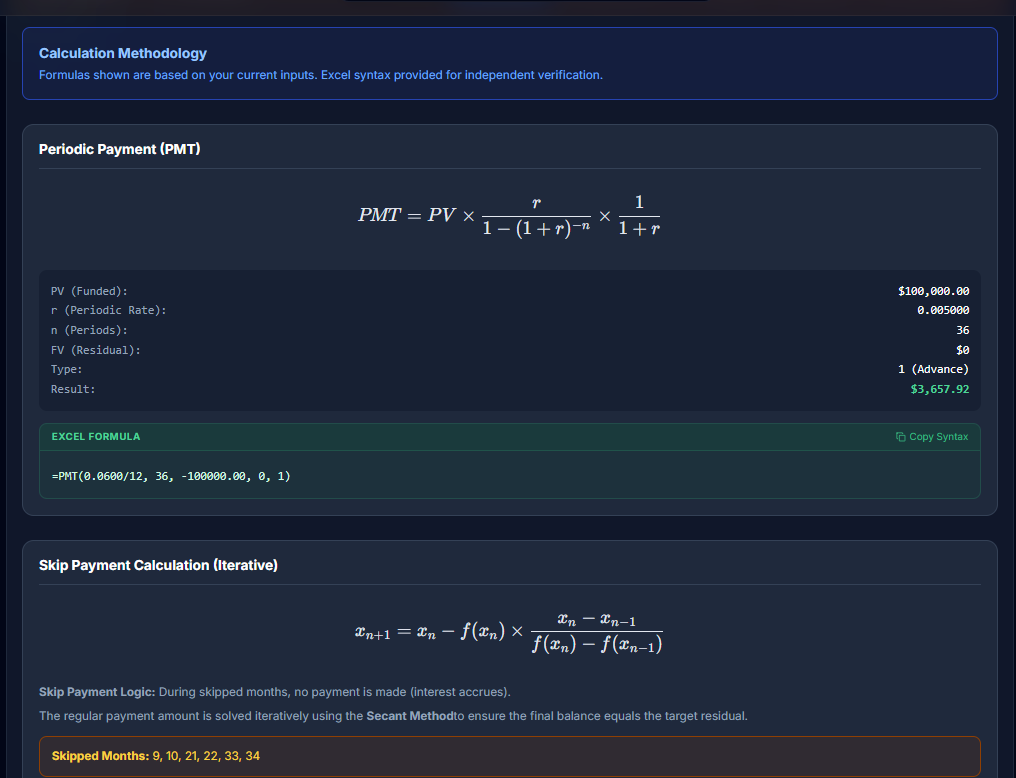
Generic calculators sometimes display a PMT equation with placeholders. That helps students. It does not help a reviewer who needs to know whether this $100,000 funded amount, this 36-month term, and this advance timing produced this $3,657.92 payment.
On the Formulas tab, each card shows:
- The mathematical form (rendered clearly, including advance/arrears and day-count logic where it applies).
- A live substitution block with the real values from your quote: PV (funded), periodic rate, periods, residual, timing type, and the highlighted result.
- An Excel formula with those values already plugged in, ready to paste into a workbook.
That combination is what turns "trust the app" into "verify the app in five minutes."
Copy Syntax: built for compliance workflows
Under each relevant formula, the green Excel Formula panel resolves placeholders into a real expression, for example:
=PMT(0.0600/12, 36, -100000.00, 0, 1)
Use Copy Syntax and drop it into Excel, your audit template, or an email to compliance. They can reconcile your quote against a function they already trust, using your rate, term, PV, FV, and advance flag, not a demo scenario.
This is intentionally independent verification language: the tab header states that formulas follow current inputs and Excel syntax is there for independent verification.
Context-aware cards (only what this deal needs)
The tab is not a static wall of every equation in finance. Cards appear based on how this deal is structured:
- Interim rent when funding and first payment do not align.
- Yield spread / commission when sell rate and buy rate diverge.
- Effective APR when points or fees affect the disclosure story.
- Balloon and interest-only structures with their own FV and period logic.
- Rate solving when you are solving for yield instead of payment.
You see the methodology that matters for this quote, not a catalog of unrelated math.
Skip months: where "show your work" gets hard
Level-pay PMT is table stakes. Skip payments are not.
When certain periods have no payment, interest-only skips, or a reduced skip amount, there is no single closed-form payment that always lands on the target residual. LeaseIQ Pro documents that honestly on the Formulas tab:
- The Secant Method (iterative root-finding) is shown as the approach.
- Plain-language explanation of what happens in skipped months.
- An orange callout listing Skipped Months for the active deal (for example: 9, 10, 21, 22, 33, 34).
Many consumer-grade lease tools either do not offer skip structures or do not expose how the payment was solved. Originators still sell skips. Compliance still asks questions. LeaseIQ Pro puts the iterative story next to the payment, not in a footnote you write after the call.
The same iterative treatment applies to step and custom payment ladders when a simple PMT line is not the whole truth.
Download Calculation Basis (PDF)
When you need something sturdier than a screenshot, use Download Calculation Basis (PDF) at the bottom of the tab.
The PDF is an audit-oriented summary: deal inputs, formula breakdowns, substituted values, and methodology notes aligned with what you had on screen when you generated it. Pair it with your branded lease proposal or amortization export when a credit committee wants documentation, not just a number.
This is calculation transparency for quoting and review. It is not a substitute for tax, legal, or regulatory filing advice. Your compliance team still owns sign-off; LeaseIQ Pro gives them better raw material.
How this fits the rest of commercial LeaseIQ Pro
- Schedule tab: proof by period (table, chart, TILA-style totals).
- Formulas tab: proof by methodology (equation, live inputs, Excel).
- Proposal tab: proof for the client (branded presentation).
Same engine, three audiences. When someone challenges a skip-heavy quote, you do not reopen a spreadsheet from last Tuesday. You open Formulas, copy the Excel line, and point at the skipped months list.
When to send what
| Audience | Suggested handoff |
|---|---|
| Internal compliance / credit | Copy Syntax into their Excel template + Calculation Basis PDF |
| External funder | PDF + amortization schedule export if they want period detail |
| Client | Proposal PDF (methodology PDF is usually internal) |
Try it on the next deal someone will question
Price a deal with skips or an unusual structure, open Formulas, and run the Excel line yourself before the reviewer asks.
Start a seven-day trial of LeaseIQ Pro and build your next quote with the math visible.
LeaseIQ Pro is built for independent commercial lease originators. Formulas and Calculation Basis PDFs support verification workflows; your shop remains responsible for compliance and disclosures.
Seven-day trial. Structure from your phone, white-label proposals, offline-first math when you need it.
Start free trial