Profit Sharing on Equipment Leases: Model Your Partner's IRR Before You Shake Hands
Equipment deals with equity partners rarely fail because someone cannot calculate a monthly payment. They get awkward when maturity arrives and nobody agrees on who is owed what from the residual, whether the partner hit their return hurdle, or how extra months in remarketing changed the math.
Spreadsheets can get you there eventually. They are painful to rebuild every time the projected residual moves, and they are almost never sitting on the same page as the quote you just showed the lessee.
LeaseIQ Pro adds a Profit Sharing tab on the commercial calculator for exactly that conversation: same deal, same term, same equity dollars, with a live waterfall between your company and a named partner.
When this tab matters
Use it when:
- A capital partner funds part of the lessor equity and wants a contracted return tied to residual performance.
- You are modeling syndication or a joint venture where surplus residual splits only after a hurdle is cleared.
- You need to stress-test remarketing cost, time to sell, or residual upside without exporting to a side file.
The tab activates when the deal has lessor equity on it (equity percentage on the economics block). No equity, no syndication story to model. The UI tells you that plainly so you are not hunting for a hidden setting.
What it looks like in LeaseIQ Pro
Open Profit Sharing from the results area on your commercial quote. Above the ledger you get a stacked bar and summary tiles (gross proceeds, each party's net, and whether the partner's IRR hurdle was met). Below that, the cash flow waterfall and proceeds cards spell out the same math in dollars and effective IRR.
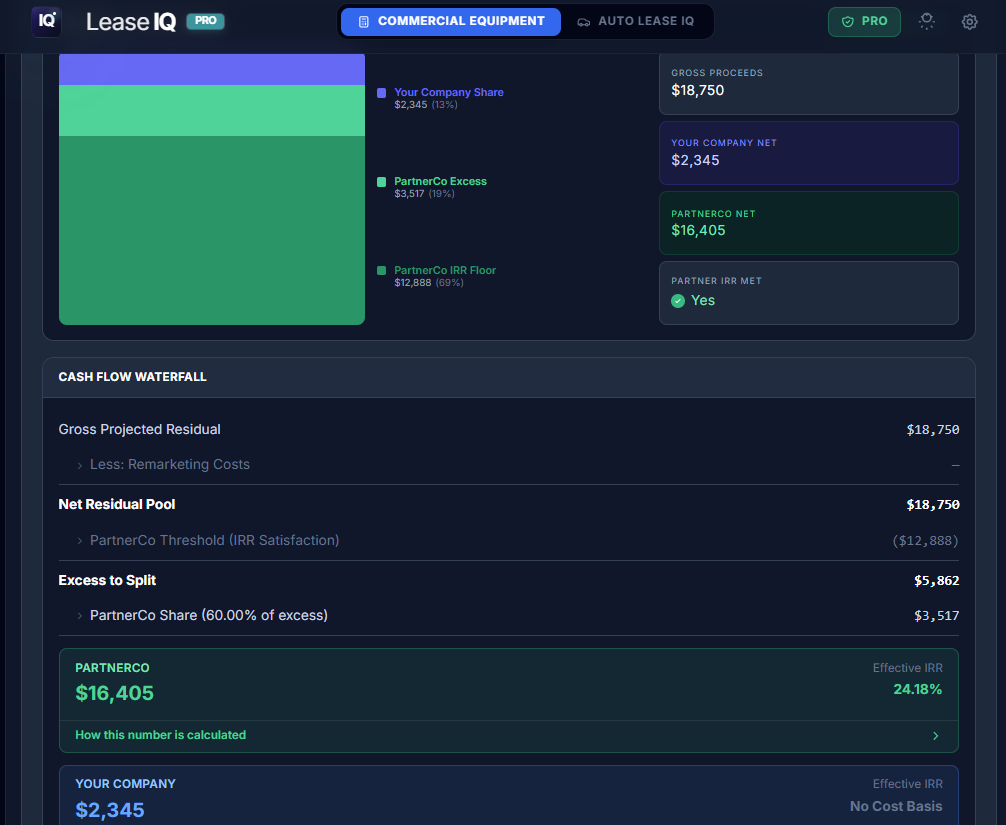
In the example above, gross projected residual flows through the partner's IRR threshold (satisfied here), then excess splits per your agreed percentages (60% to PartnerCo in this deal). Your Company receives only the surplus slice above the hurdle; effective IRR shows No Cost Basis when you did not co-invest equity, which is the honest answer instead of a fake yield on zero dollars in.
Parties, equity inputs, and the projected-residual slider sit above this view in the same tab. Change residual or remarketing assumptions and the bar, waterfall, and status badge update together.
Step 1: Name the parties
Start with Your Company and Partner Company labels. That sounds cosmetic; it is not. Every threshold line, split label, and PDF heading uses those names so a printed report reads like a term sheet fragment, not "PartnerCo" from a template.
Step 2: Lock the equity and the partner's IRR
The engine reads total deal equity from the quote (equipment cost times your lessor equity %). You then set:
- Partner required annual IRR, compounded monthly on the equity invested (the same compounding discipline credit people expect, not a hand-waved annual guess).
- Contracted residual from the signed deal documentation (your baseline expectation at maturity).
Optional but common: Equity is co-invested. Check this when your shop also funded part of the equity. You enter partner % and your % of the equity stack (they must sum to 100%). Dollar amounts update immediately so both sides see skin in the game.
Step 3: Define the split above the hurdle
Below the IRR story sits the profit split arrangement: after the partner's threshold is satisfied, excess residual is divided by percentage (again summing to 100%). This is the syndication language brokers actually negotiate: "You get your return first; we split what's left 60/40."
Step 4: IRR threshold analysis (the hurdle in dollars)
LeaseIQ Pro converts the partner's IRR into a minimum net residual they need at the end of the economics:
- Threshold at lease end (no remarketing delay).
- Threshold with delay applied when you enter remarketing delay months (months to sell after lease end).
- Delay cost to partner showing how much the hurdle rose because the clock kept running.
That last line is the feature partners care about in the real world. Every month the asset sits unsold, their compounded return target does not pause.
Step 5: Projection workspace and the live waterfall
The projection workspace is where deals become legible in a meeting:
- Remarketing costs (auction fees, transport, refurbishment) come out of gross residual before anyone splits.
- Projected residual can be typed or dragged on a slider (roughly 50% to 300% of contracted residual) to model soft markets, strong remarketing, or conservative cases.
- A cash flow waterfall walks line by line: gross projected residual, net pool, partner threshold, excess (if any), then proceeds and effective IRR for each party.
- A stacked bar plus cash flow waterfall table so spreadsheet people and visual learners see the same story.
- Status is explicit: Threshold met (green) or Threshold not met with a shortfall dollar amount and no pretend "excess" split.
Drag the slider once in front of a partner and the conversation shifts from "trust me" to "here is what happens if remarketing comes in $40k light."
Print a partner-ready report
When the model is where you want it, Print Profit Sharing Report generates a PDF from the same state as the tab. Use it for internal credit memos, partner emails, or pre-funding alignment. It is still modeling and quoting, not tax, legal, or filing advice. Your counsel and CPA remain the authority for how you document the JV.
How this fits next to broker, funder, and agent views
The Broker / Funder / Agent toggle on deal structure answers "who earns what during the lease." Profit Sharing answers "who earns what at the end, after residual and equity hurdles." Serious shops need both on one quote, not two files that drift apart.
If you already use LeaseIQ for step, skip, balloon, or the schedule chart, profit sharing is the same philosophy: fewer rebuilds, more clarity while the deal is still moving.
Quick checklist before you call the partner
- Equity % on the deal matches what you are actually funding.
- Contracted residual matches the documented deal, not a hopeful remarketing guess.
- Remarketing cost and delay reflect a realistic exit, not best case.
- Split percentages sum to 100% on equity (if co-invested) and on excess.
- Run at least two projected residuals (downside and base) and save the scenario in your vault.
Try it on the next syndicated quote
If your next equipment deal has a partner who speaks in IRR and waterfall language, run the structure in LeaseIQ Pro first, then open Profit Sharing before you send term language.
Start a seven-day trial and model the split on the same screen as the payment quote.
LeaseIQ Pro is built for independent commercial lease originators. Profit Sharing requires lessor equity on the deal; terms and legal structure remain your responsibility.
Seven-day trial. Structure from your phone, white-label proposals, offline-first math when you need it.
Start free trial